


Landscape Design - AI Garden
4.4352.00 Reviews
App Specs
- Version
- 1.0.41
- Updated On
- License
- Free
- Downloads
- 100,000+
- Developer
- MOBIVERSITE YAZILIM BILISIM REKLAM VE DANISMANLIK
- Categories
- House & Home
- Platform
- Android
Screenshots

 Analysis by AppCompare
When I am stuck looking at the same patch of lawn and wondering what it could become, a visual starting point is far more useful than another page of generic garden inspiration. That is the idea behind Landscape Design - AI Garden: use a photo of an outdoor space to explore possible designs. I see it as a brainstorming companion, not a replacement for measuring, planning, or checking whether a plant will thrive where I live.
A photo gives the ideas somewhere to begin
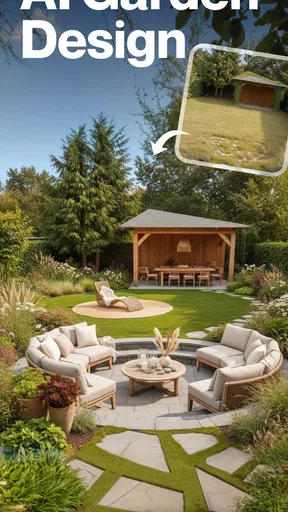
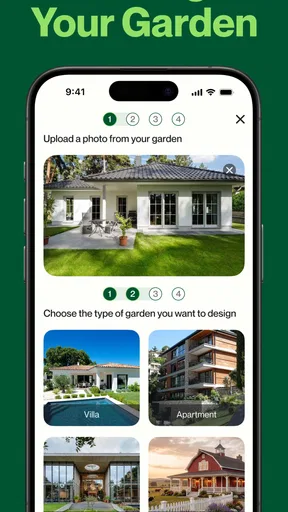
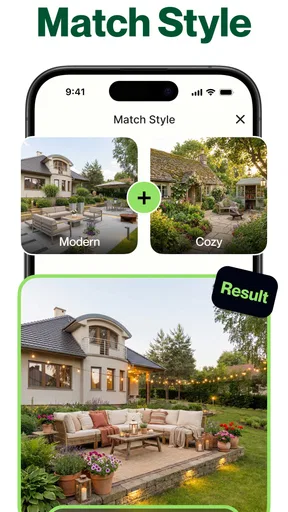
The most distinctive part of this House & Home app is its photo-based AI garden design approach. Rather than asking me to imagine how a path or planting bed might fit, it starts with an image of the space I want to change and offers design suggestions. That makes the first step feel approachable, especially if I have no drawing skills and only a vague sense that the yard needs a refresh.
The practical value is not that an AI suggestion is automatically right. It is that I can react to something visible: perhaps I like the general layout but not the planting choices, or I realize that I want a more open area instead of another feature. Used that way, the image is a prompt for decisions rather than a finished plan to follow blindly.
The First Impression
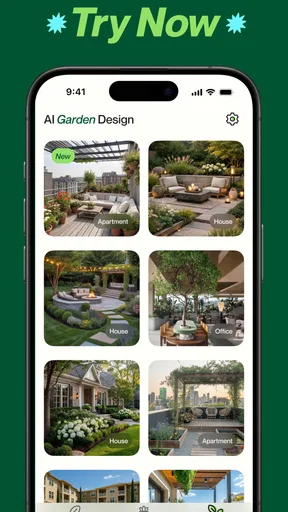
Jumping into the app for the first time, it's clear the developers have put some thought into the interface. It’s clean, intuitive, and doesn’t try to overwhelm you with too many features at once. The home screen is your launchpad to all things landscaping, with options that even a total newbie can navigate without needing a tutorial.
Features Galore
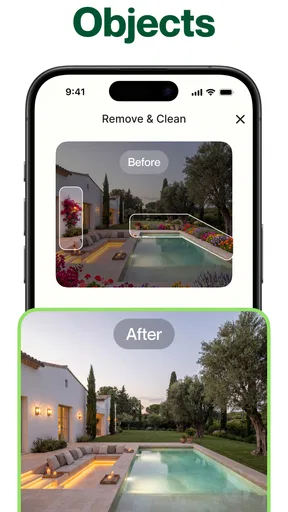
The real magic of Landscape Design - AI Garden lies in its AI-driven design tools. You start by taking a photo of your current garden or the space you want to transform. The app then works its magic, offering a plethora of design suggestions tailored to your space.
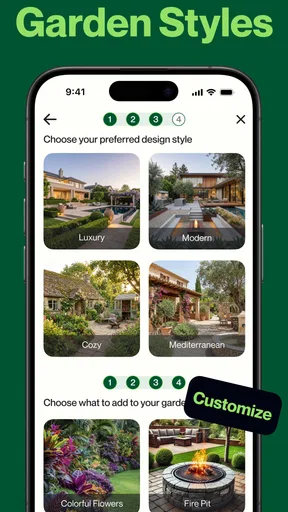
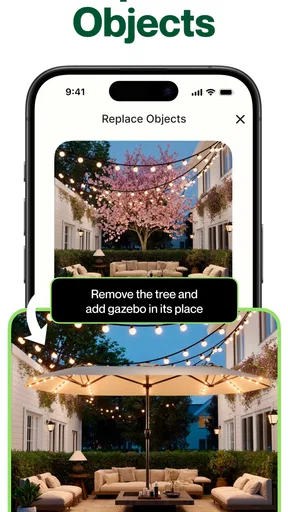
What’s cool is the ability to tweak these suggestions. Want a bit more color? You can swap in different plant species until you find the perfect palette. The plant database is extensive, offering everything from native flora to exotic blooms. I was pleasantly surprised to find some of my favorite plants in there, complete with care instructions!
Turning a concept into a practical plan
I would use those variations to compare broad choices before buying anything: a leafy border against a simpler, lower-maintenance look, for example. Keeping one version as a reference while changing another detail at a time makes it easier to tell what actually improves the design. If I change the plants, path, and furniture all at once, I lose track of which choice made the space feel better.
Worth Reading Before You Choose

EA SPORTS FC Mobile 26 Is a Bigger Football Game, but It Takes Time

Flipboard Shows What News Apps Must Do Beyond the Feed

Switching to Android Auto Means Rethinking Your Driving Routine

Google Calendar Makes a Crowded Week Easier to Manage

Ludo King Makes the Most of the Minutes Between Plans

Baby Panda World Brings Quick Play to Modern Phones, but Its Game Library Feels Busy
A photo also has limits as a planning tool. It captures a view, not the full shape of a yard, and it cannot by itself settle questions such as drainage, shade through the day, soil, or the space needed to walk comfortably. I would treat the visual result as a conversation starter, then check those practical details in the real garden before spending money or beginning work.
Interactive and Engaging
One of the standout features is the interactive map. It lets you drag and drop elements like pathways, ponds, and even outdoor furniture. It’s like playing a game, but instead of leveling up, you get a real-life garden makeover.
That kind of editing is especially useful when a household has different priorities. I might want a clear route from the door, while someone else wants room for a table or a pond. Moving elements around gives us a concrete way to discuss the layout, rather than relying on descriptions that each person imagines differently. It still helps to check the actual clearances outdoors; a design that looks balanced on screen can feel cramped when people need to pass through it.
Best suited to a weekend refresh
Picture a Saturday morning with a tired patio, a few photos, and no firm budget or design in mind yet. I could use the app to explore whether the space feels more inviting with a path, a seating area, or a stronger planting palette, then save the most promising direction as a reference for shopping and measuring. That is a realistic, low-pressure use: make decisions before hauling home plants or rearranging heavy furniture.
For a renter, the same visual exploration could help identify reversible changes, such as movable pots or furniture, while avoiding a commitment to permanent construction. For a homeowner planning a major redesign, it may help communicate an early mood to family or a professional, but I would not treat a generated view as a construction drawing or a reliable materials list.
Interactive and Engaging
And if you’re not quite sure about your design chops, the app includes a community section. Here, you can share your designs and get feedback from fellow garden enthusiasts. It’s a great way to learn and get inspired. I’ve seen some incredible transformations shared by users that made me want to up my garden game.
Compared with browsing image boards or garden magazines, this approach has a useful advantage: ideas are tied to a space you photographed, and the map gives you a way to experiment with placement. The trade-off is that a polished inspiration image can be easier to judge than a proposed layout for your actual yard. Compared with hiring a landscape professional, the app is a lower-commitment place to explore, but it cannot replace site knowledge or a detailed plan when the project involves complex levels, drainage, or permanent structures.
Learning as You Grow
Another gem is the educational aspect. The app offers tips and tutorials on garden care, from planting techniques to seasonal advice. This means you’re not just creating a pretty space, but you’re also learning how to maintain it. The advice is practical and doesn’t assume you have a green thumb, which is a relief for those of us who are better at admiring plants than growing them.
One sensible habit is to use the care guidance as a checklist for questions, not as a guarantee that every suggested plant suits every climate. Before choosing a plant, I would consider local growing conditions and the amount of time I can realistically give it. A design that looks great but depends on regular upkeep may be a poor fit for someone who wants a relaxed, low-maintenance yard.
Who gets the most from it
I think the strongest fit is someone who has an outdoor space but finds it hard to picture alternatives, especially a beginner who wants to compare a few directions before taking action. It is also useful for people who enjoy testing layouts visually and learning as they go. Someone who already has a professional plan, needs exact measurements, or wants guaranteed horticultural recommendations may be better served by a landscape designer, local nursery, or a dedicated planning tool.
The app is free to download, with in-app purchases ranging from $3.99 to $199.99 per item, so I would explore the basic experience before deciding whether any paid option is worthwhile. It is rated for Everyone, and MOBIVERSITE YAZILIM BILISIM REKLAM VE DANISMANLIK is the developer. Its 4.4 average from around 12,000 ratings and more than 100,000 installs suggest it has found an audience, though popularity does not tell me whether its particular design style will suit my yard.
Challenges and Considerations
No app is without its quirks, and Landscape Design - AI Garden is no exception. While the AI suggestions are mostly spot-on, there were times when the design didn’t quite match my vision. It seems the AI is still learning, which is exciting if you think about it. Sometimes, it felt like I was collaborating with a slightly eccentric artist who had a mind of their own.
That mismatch matters most when I expect a generated design to understand constraints that are not obvious in a photo. I would take a clear image that shows the area I want to change, then compare suggestions with the actual access, sunlight, and features I need to keep. If an idea repeatedly ignores a practical requirement, I would stop trying to force it and use the app for inspiration instead. That is a better use of its strengths than treating every result as an instruction.
The app is free, but optional purchases mean it is worth checking what is included before committing to anything. For a small refresh, I would first see whether the available design exploration is enough to make a decision. For a high-stakes project, spending on a professional consultation may deliver more dependable advice than paying for extra digital inspiration.
The Bottom Line
All in all, Landscape Design - AI Garden is a fantastic tool for anyone looking to revamp their outdoor space. Whether you’re a seasoned gardener or just starting out, the app has something to offer. It’s user-friendly, packed with features, and makes garden design feel more like play than work.
Its current version is 1.0.20 and it requires Android 8.0 or later. I would recommend it most to someone who wants to turn a vague backyard idea into a few visual options, then make grounded decisions outside the app. I would skip it as my main tool for precise dimensions, contractor-ready plans, or site-specific horticultural certainty.
So, if you’ve ever looked at your backyard and thought it could do with a little magic, give this app a whirl. Your future self—and your plants—will thank you. Happy gardening!
Pros
- AI-driven design suggestions enhance creativity.
- User-friendly interface for easy navigation.
- Extensive plant database with detailed info.
- 3D visualization for realistic garden previews.
- Integration with popular garden tools and apps.
Cons
- Limited free features; premium required for full access.
- Occasional lag on older devices.
- In-app ads can be intrusive.
- Customization options can be overwhelming.
- Requires constant internet connection for updates.
FAQs for Landscape Design - AI Garden
What features does Landscape Design - AI Garden offer?
Landscape Design - AI Garden provides a comprehensive suite of tools for planning and visualizing outdoor spaces. Users can access AI-driven design suggestions, a vast library of plants and structures, 3D rendering capabilities, and collaboration features for sharing and refining projects with others. This makes it ideal for both amateur gardeners and professional landscapers.
Is Landscape Design - AI Garden suitable for beginners?
Yes, the app is designed with user-friendliness in mind, making it accessible for beginners. It offers guided tutorials, an intuitive interface, and AI suggestions to help users create stunning garden designs without prior experience. However, it also includes advanced tools for more experienced users looking to refine their projects.
Does the app require an internet connection to function?
While some features of Landscape Design - AI Garden can be accessed offline, such as basic design tools and saved projects, an internet connection is required to access the AI-driven suggestions, library updates, and collaborative features. This ensures users have the latest resources and can share their designs efficiently.
Are there in-app purchases in Landscape Design - AI Garden?
Yes, while the app offers a variety of free features, there are in-app purchases available. These may include additional plant libraries, premium design templates, and advanced rendering tools. Users can choose to purchase these to enhance their experience and unlock more sophisticated design options.
Can I export my garden designs for professional use?
Absolutely. Landscape Design - AI Garden allows users to export their designs in various formats suitable for professional presentations, including PDF and high-resolution images. This feature is particularly useful for landscapers and designers who need to present their projects to clients or stakeholders.


